Edit
a Price Sheet: Individual Price Editing
Edit
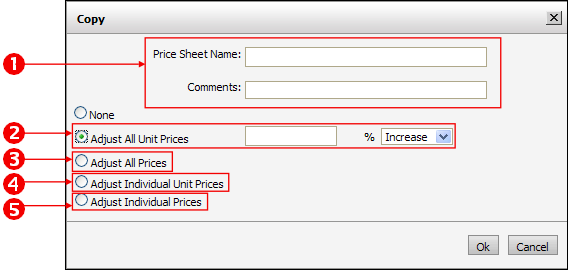
a Price Sheet: Individual Price EditingMarketDirect StoreFront provides you with tools for adjusting the prices on your price sheets (1) individually or (2) globally.
1 Individual price editing: You can open a price sheet and edit one or more item prices as needed—adjusting only those values that need to be adjusted and leaving the others as they are.
● Example: You would select this option, for instance, to increase the price of a specific Media (e.g., 100# glossy cover stock) to match a wholesale price increase.
2 Global price editing: You can copy an existing price sheet and adjust the values globally for all or only selected priceable components by a certain percentage (increase or decrease).
● Example: You would select this option to make across-the-board price adjustments, such as discounting all prices on a price sheet by 10% for a sales promotion you are running for a particular company or Print Shop.
Edit
a Price Sheet: Individual Price EditingEdit
a Price Sheet: Global Price Editing● Overview of the Price Sheet Management Page
● How to Use Special Pricing for a Company or Print Shop
● Adjust Prices Using the Quote Editor