
 License Extended Applications
Extended applications is a licensable option that passes user credentials to both Graphic Communications and non-Graphic Communications third-party external applications. The external application is then presented in a frame within MarketDirect StoreFront. This new feature extends the capabilities of MarketDirect StoreFront by allowing users to have external applications such as print business management systems (such as Pace or PrintStream) displayed in a MarketDirect StoreFront window.
To enable administrative users to access the extended application configuration pages, select the appropriate pages (e.g., Manage Extended Apps) on the Page Access page. For more information, see Manage Page Access. To specify who can use the extended applications, see the To assign access rights to embedded applications section later in this topic.
Please note that data is not communicated between MarketDirect StoreFront and the external application.
License Extended ApplicationsConfigure (or edit) a Graphic Communications
Extended Application or External Extended Application
Assign access rights to extended applications
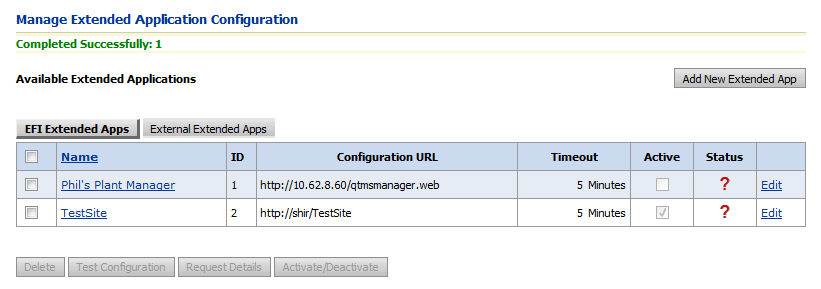
The Available Extended Applications table lists all extended applications set up in MarketDirect StoreFront.
● Add New Extended Application: Adds a new extended application (and a new row) to the Available Extended Applications table.
● Delete: Removes the selected extended application and it row from the Available Extended Applications table.
● Test Configuration: This tests the extended application. The results of the test will be reported at the top of the screen (e.g., "Completed Successfully" or "Failed: 1 There was an error. Please see the Event Log for more information").
● Request Details: This does two thing: (1) it tests the configuration to ensure that MarketDirect StoreFront can actually communicate with the extended application, and (2) retrieves information about the extended application in order to redirect to it. This results in getting the implementation URL, which takes users to the homepage of the extended application, as well as any items (e.g., query string tokens) needed to redirect to the external application.
● Activate/Deactivate: Toggles the selected extended application between an active and inactive state.
● MIS integration and fulfillment in MarketDirect StoreFront


 ) will help
you locate the group or user you are looking for, and the
) will help
you locate the group or user you are looking for, and the