
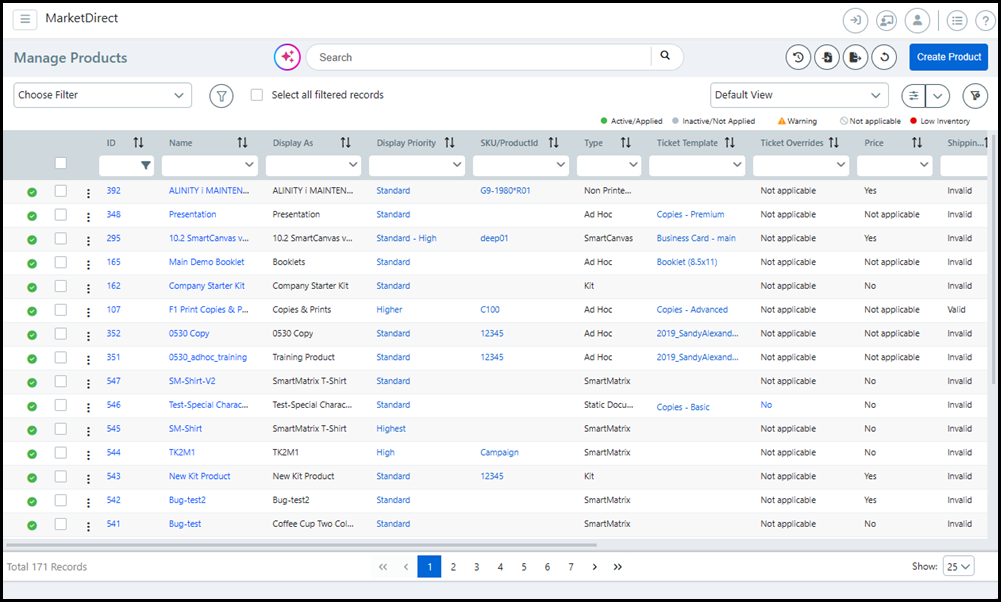
The Manage Products page is a central command station for product administrators. The page provides product administrators with a single access point for every product in the system. Designed to enhance productivity and streamline product management tasks, the page lets operators create personalized views to suit every workflow. Sophisticated search, sort, and filtering capabilities help administrators zero in on just the products they need to manage and perform bulk management tasks in a single operation.
The Manage Products page was completely redesigned for v. 11.0 and provides product administrators with:
● a single access point for every product in the system
● powerful search, sort, and filtering tools to zero in on a subset of products for targeted users and uses
● tools to save those sort and filter settings for later use and create as many custom filters and personalized views needed for various product workflows
● in-line editing tools to complete various editing tasks without leaving the products page
● bulk processing tools to perform common tasks on all selected products at once
● To open the Manage Products page, go to Administration > Products.

 Introduction
to the Manage Products Page
Introduction
to the Manage Products Page
|
|
Column or Control |
Description |
|
The
search bar can be used as a Global
Search or
AI powered
search. For more information on the search bar options, see Search and sort data. |
Status color code key |
Hovering over any warning icon The Low Inventory icon will be present only on sites with the licensed MarketDirect Fulfillment option. |
[Inventory Level] |
The Low Inventory level indicator will be present only on sites with the licensed MarketDirect Fulfillment option. |
[Status of the Product] |
|
 |
Use the easy import/export buttons to quickly export product information into a CSV file, or import product edits into MarketDirect StoreFront using a CSV or ZIP file. |
|
Refresh all data on the page. |
|
Launches the process of creating a new product from scratch; for more information, see Creating Products. |
|
Item selection box. ● Select the column header box to select all records on the current page of the table. ● Select the box on each row to select that record or line item. |
ID |
The unique item ID for the product that is automatically generated by the system when the product is created. This number is read-only and is unique across the entire system. To
filter on this attribute: In the column header
field, enter a number or range of numbers. Click
|
Name |
Name of the product. To filter on this attribute: In the column header field, enter a term or sequence of letters. Use the drop-down list in the column header field to limit results to a specified product type(s). |
Display As |
The Display As name for the product. To filter on this attribute: In the column header field, enter a term or sequence of letters. |
Display
Priority |
This sets the product's position on the storefront home page (from top to bottom) with higher priority corresponding top of the page and lower priority moving down toward the bottom of the page. To filter on this attribute: In the column header field, select an option from the drop-down list. You can edit this attribute for each line item by clicking the pencil icon in the field and selecting an option from the drop-down list. |
SKU/Product
ID |
The SKU or product ID assigned to the product by the person who created it. To filter on this attribute: In the column header field, enter a term or sequence of letters and numbers. You can edit this field for each line item by clicking the pencil icon in the text entry box and entering a new code. |
Type |
Type of product (ad hoc, non printed, kit, static, etc.). To filter on this attribute: In the column header field, select an option from the drop-down list. |
Ticket Template |
The name of the ticket template associated with the product. To filter on this attribute: In the column header field, select an option from the drop-down list. |
Ticket
Overrides |
Whether the ticket associated with the static product contains overrides. To filter on this attribute: In the column header field, select an option from the drop-down list: Yes, No, Not applicable
Please note that using ticket overrides to add special pages and tabs to a static product will create a versioned saved job. If you later change the ticket template associated with the product (e.g., remove a color print option) the product will still refer to that or print service, which will create problematic reorders. |
Price |
Whether the product has a fixed priced assigned to it. To filter on this attribute: In the column header field, select an option from the drop-down list: Yes, No, Not applicable You can set the view up to show pricing with an
icon |
Shipping Status |
Shows
the configuration status of ExpressRater for the product. To filter on this attribute: In the column header field, select an option from the drop-down list: Valid, Invalid, Not applicable |
Size |
Size of the files in the product in kilobytes (KB). To filter on this attribute:
In the column header field, enter a number or range
of numbers. Click |
Mobile Supported |
Toggle the switch to show or hide a product from the catalog when the buyer is accessing the storefront on a mobile device. To filter on this attribute: In the column header field, select an option from the drop-down list: Yes, No You can edit this field for each line item by clicking the pencil icon in the field and selecting an option from the drop-down list. |
Rules |
Indicates whether the product has a Dynamic Web Form rule associated with it. To filter on this attribute: In the column header field, select an option from the drop-down list: Yes, No, Not applicable Applies only to VDP and SmartCanvas product types. |
Categories
|
The categories to which the product is published. To filter on this attribute: In the column header field, select an option from the drop-down list. You can edit this field for each line item by clicking the pencil icon in the field and selecting categories in the Publish / Un-Publish window. |
Company
|
The company (customer) with which the product is associated. To filter on this attribute: In the column header field, select an option from the drop-down list. You can edit this field for each line item by clicking the pencil icon in the field and selecting an option in the Select Company window. |
Pricing
Group |
The pricing group assigned to the product. To filter on this attribute: In the column header field, select an option from the drop-down list. You can edit this field for each line item by clicking the pencil icon in the field and assigning a pricing group to the product in the Select Group window. For more information on Pricing Groups, see Edit_single_products_with_quick_access_links. |
Overview
of Product TypesA product is any item (or set of items: jobs, files, or documents) that buyers can order from your online store. The major product types supported include:
● Ad Hoc: A product that buyers create using their own content (e.g., uploaded files) and the printing and finishing options you offer.
To create an Ad Hoc product, see Create Products.
● Box: A corrugated or paperboard package product.
This is a licensed option. For more information, contact your ePS sales rep or reseller. To create a Box product, see SmartBox Designer - Box Products.
● Digital Download: A product such as an eBook that a buyer can order and download in digital format.
To create a Digital Download product, see Create a Digital Download Product.
● ePS VDP: Personalized variable data products created with MarketDirect StoreFront's native VDP template designer and artwork generation engine, which enables you to create variable data products your buyers can use to reach their own customers with personalized direct mail campaigns. Combining ePS VDP with image personalization and AccuZIP direct mail services results in a true end-to-end solution for direct mail marketing campaigns.
This is a licensed option. For more information ePS VDP products, see Create an ePS VDP Product.
● Fulfillment: Fulfillment products (FF-Inventory type products) are finished goods kept in stock and ready to ship, or print on demand products produced when ordered.
This is a licensed option. For more information on Fulfillment products, see Fulfillment Module.
● Rental: Rental products (FF-Rental type products) are products kept in stock and ready to ship on demand for rental purposes such as events and trade shows. These products are expected to be returned and shipped again.
This is a licensed e-commerce option for the Fulfillment module. For more information on Rental products and the Rental and Reservations module, see Fulfillment Module.
● Kit: A set of (non-kit) products assembled into a package and purchased together.
To create a Kit product, see Create Kit Products.
● Non-Printed: An item that is not a print product (e.g., finished goods, paper clips, a carton of pencils, a ream of paper).
To create a Non-Printed product, see Create Products.
● Product Matrix: A composite product (which, like a kit, is a product composed of other products) that lets offer buyers a convenient way to order from a variety of related products. For instance, you can offer a T-shirt in four sizes and four colors so that buyers can select the T-shirt product and then select a color and size.
To create a Product Matrix product, see Create Matrix Products.
● Static: A document that has fixed content (e.g., a course-pack of readings) and limited print and finishing options for buyers. Static products are defined by the print provider.
To create a Static Document product, see Create Products.
● SmartMatrix: A composite product designed to streamline the creation of products with a large set of attributes that contain multiple options. Instead of creating multiple products and mapping them to a single product type, like Matrix and Kit composite products, you can create a single product that contains all the possible attribute combinations. SmartMatrix is perfect for apparel, drink ware, luggage, and anything else that can be sold in different variations of shapes, sizes, colors, and designs.
To create a SmartMatrix product, see Create SmartMatrix Products.
● Variable Data Product: A template-based printed product that can be customized for a range of recipients with variable information such as customer name, address, phone number, etc. This product type is available only if you have licensed one of the VDP modules (FusionPro).
To create a FusionPro
variable data product, see FusionPro
Products.
To create a SmartCanvas
product, see SmartCanvas.
Search
and sort data To search data
You can search for data using the Global Search bar.

Enter a term from one of the following fields into the search bar and click the magnifying glass icon.
Searchable fields include:
Product Name
Display As
SKU/Product ID
Description Footer
Brief Description
Long Description
Keywords
You
can only search one field at a time.
The Global Search bar results are not a saved view
and will need to be entered again when you visit the page
at a later time.
You can search for data using the search capabilities in the heading row of any column.
● For data with user-defined values such as product Name, SKU/Product ID, Categories, you can search for partial or complete matches using like search terms entered directly in the field.
● Numerical value data columns (e.g., Product ID #, Available Qty, etc.) can be searched / filtered using operators. For example, >500 will show all Product ID values greater than 500.
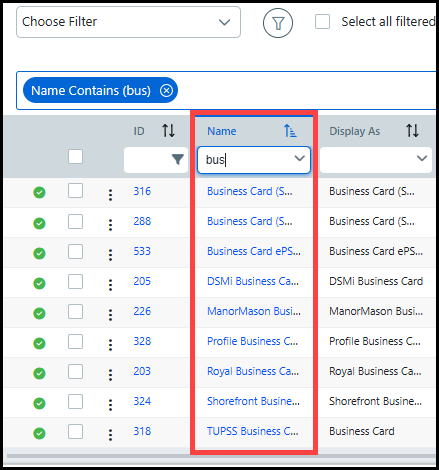
● Alphabetical value data columns (e.g., Name, Display As, Customer) can be searched with like searches and will automatically begin filtering with every entered character. For example, a search for bus will return all product names that include the characters bus (i.e., bus, bush, busy, business, etc.).
You can type any character and press Enter to filter the data without having to select an option from the drop-down list.
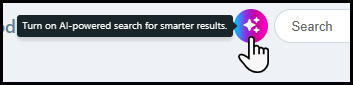
You can search for data by using the AI powered search.

Click the AI powered search button.
Click
the Close button to disable the AI powered search.

Enter a phrase into the search bar and click the magnifying glass icon.
The AI
powered search allows
administrators to locate data using flexible, conversational
language. MarketDirect StoreFront
encourages administrators to provide feedback on the search
results by using the Like,
Dislike, and Comment options.

You can further refine your search by using the enhanced column filters.
The enhanced column filters will only be available when you are using the AI powered search.
Enter a search term into the column field and choose a filter from the drop-down list.

To sort data
You can select a sort order for data in each column. The sort options will vary based on the type of data in the column, but the sort order control will be in the top right-hand corner of each column header. Each data column can be sorted either in ascending or descending order.
● For alphabetical data columns, the sort control will reverse the sort order (from A-Z and from Z-A).
● For numerical data columns such as ID, Size, Available Quantity, the sort control will reverse the sort order (from 0-largest number and from largest number-0).
● For fixed category data columns such as Display Priority and Mobile Supported, the sort control will reverse the sort order (from Lowest-Highest and from Highest-Lowest; and Yes-No and No-Yes).
To remove a filter from a column,
click the x in the column header field: 
Use
data filters to show only a subset of productsThe system's filtering feature enables sophisticated filtering operations to drill down and isolate only those items that are relevant for a particular user or use. You can use the built-in filters and create custom filters tailored to your product management workflow(s).
You can also perform bulk operations on filtered items; see Bulk Operations in this help topic.
The system ships with built-in global filters that narrow the records in the Manage Products table. The filters include:
● All (shows all products in the list, unfiltered)
● Active or InActive
● Supported or Not Supported on Mobile
● Price or Not Priced
● Published or Not Published
● Low Inventory
To filter data using a built-in filter
1 Go to Administration > Products.
2 Open the Choose Filter drop-down list.
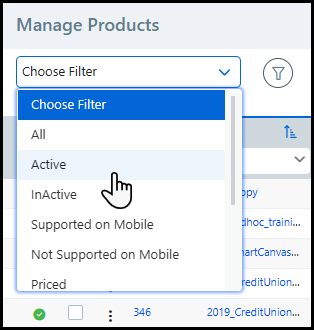
3 Select a global filter to narrow the selection of products shown in the Manage Products table:
● All (shows all products in the list, unfiltered)
● Active or InActive
● Supported or Not Supported on Mobile
● Price or Not Priced
● Published or Not Published
● Low Inventory
The Manage
Products table will display on those products with
the filtered criteria.
You can filter on the data columns as needed to further narrow
your focus.
You can create as many custom filters as you need to suit your product management workflows and access them from the filters list as needed.
Custom filters are created at the user level. Thus, the filters you create will be available only to you when you are logged in with your user credentials.
A sample use case: Let's say your product table contains 1,500 products. On a regular basis, you need to manage only products published to a specific category and associated with a particular company. You could configure these filters manually every time you need to perform the tasks in this workflow, but the better option is to create a custom filter that you can access as needed. In this case, you could select the built-in Published filter so only published products are shown in the products table and then filter the Company data column for the particular target company whose published products you want to manage.
1 Go to Administration > Products.
2 Open the Choose Filter drop-down list.
3 Select a global filter to narrow the selection of products shown in the Manage Products table:
● All (shows all products in the list, unfiltered)
● Active or InActive
● Supported or Not Supported on Mobile
● Price or Not Priced
● Published or Not Published
● Low Inventory
4 Filter on the data columns as needed to further narrow your focus.
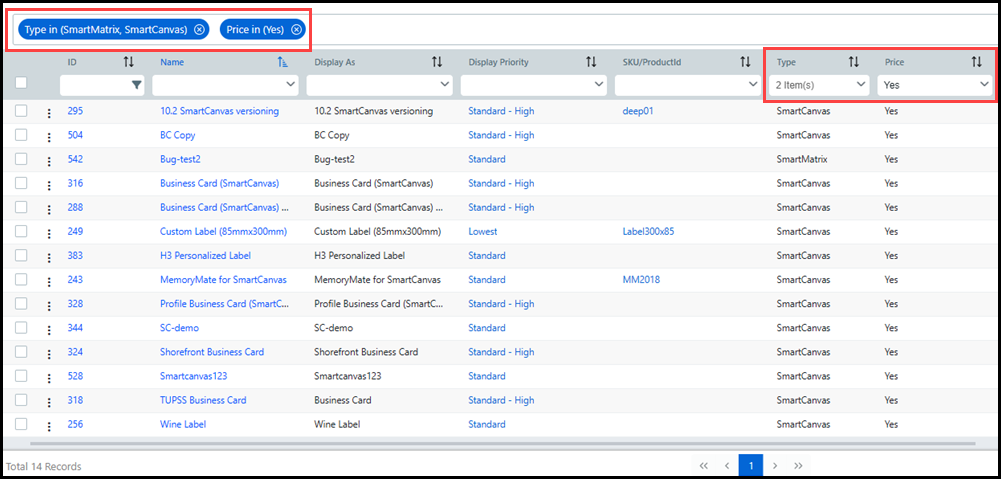
5 When you have applied all filters needed to limit the data, save the filter with a descriptive name:
● Go to the global filters area and open the filter menu.

● Select Save Filter As.
If you make changes to any existing filter, click Save Filter to update the filter and save your changes.
● In the Save Filter Option window, specify a Filter Name.

● Click Save.
The new filter will be listed
in the Choose Filter
drop-down list in the custom filter section (below the dashed
line).

To limit the filters shown in the Choose Filter pull-down list
1 Open the save and manage filters drop-down menu and select Manage Filters.
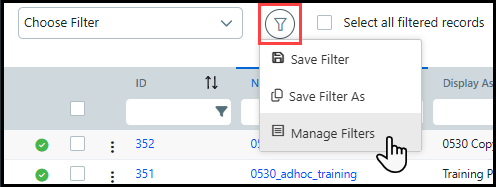
2 Deselect
all filters you want to exclude from the Choose
Filter list using the eye icon  .
.
You can include  or exclude
 any filter in the list as often as needed.

3 Click Close.
To delete a custom filter
1 Open the save and manage filters drop-down menu and select Manage Filters.
2 Click
the trash can icon to remove a custom filter.
You cannot delete a built-in filter.

3 In the Confirm window, click Yes.

4 Click Close.
To clear all selected filters
● Go to the Views section and click the un-filter icon.
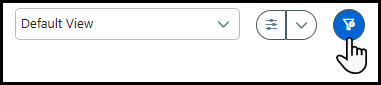
All records and data columns will be shown in the Manage Products table.
Create
a personalized product view to suit your workflow needs and preferencesYou can customize the Manage Products page with your preferences for what product data is shown and how that data is sorted, filtered, and arranged. You can create any number of personalized views, such as a different view for each workflow. For example, an operator who works only for a specific customer or with a specific product type can define a custom view filtered for the Customer and product Type and then select any personalized view to make the default for his or her login (i.e., the view in effect whenever s/he logs in to the Manage Products page). Any other view will be accessible via single click from the view pull-down list (and the system default view is always available in the list to show all data in the products table).
The objective is to ensure that product data is presented in a way that best suits each product administrator's workflow.
Example: You are the designated administrator for all Non Printed and FF-Inventory (fulfillment) products in your system. You have nothing against Ad Hoc products or Digital Download products, but you prefer not to have to climb over them to get to your target products.
The problem: You don't want to have to set the page up with your preferences every time you start a workflow.
The solution: Set up the products page so that only the target product types are shown in the products table. You can further filter those special interest product records, rearrange the order of the columns, and specify the sort order of data in each column. In Customize List window, deselect other irrelevant data columns (e.g., Price, Categories) then save the view with a descriptive name. Then toggle between / among views as needed (can always summon the default view, which displays all data columns).
To create a personalized view
1 From the Administration home page, click Products.
2 In this case, you want only those columns that are relevant for your 2 product types (Non Printed Products and FF-Inventory) to be shown in the products table.
● Go
to the views area and click  .
.
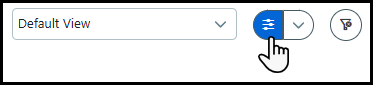
● In the Customize List window, which lists all available data columns:
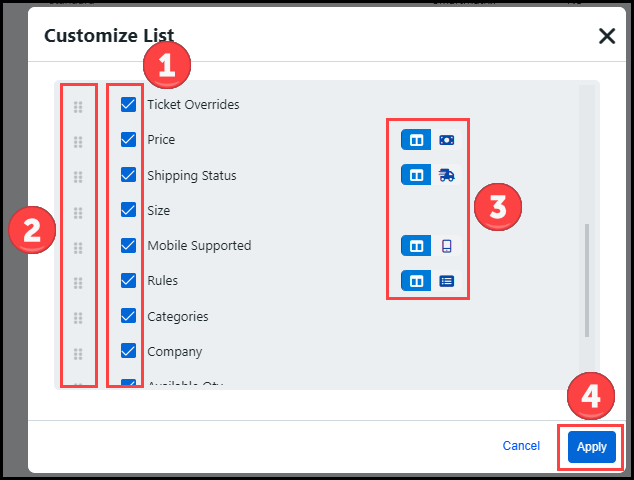
●  Deselect (un-check) the columns to exclude
from the products table.
Deselect (un-check) the columns to exclude
from the products table.
●  Click the drag and drop
icon to rearrange the order of columns in the table.
Click the drag and drop
icon to rearrange the order of columns in the table.
The higher the column is in the list, the farther left it will be in the products table: higher = left, lower = right.
●  Certain data columns can
be shown in the table as an icon instead of a text-labeled
column. In the image above, the Price, Shipping Status, Mobile
Supported, and Rules columns have an icon option. This makes
more efficient use of screen space.
Certain data columns can
be shown in the table as an icon instead of a text-labeled
column. In the image above, the Price, Shipping Status, Mobile
Supported, and Rules columns have an icon option. This makes
more efficient use of screen space.
To use the icon instead
of column text, click the icon  . It will
be shaded in blue when it is active and the column will be
shaded in white:
. It will
be shaded in blue when it is active and the column will be
shaded in white:  (icon off);
 (icon on).
●  Click Apply.
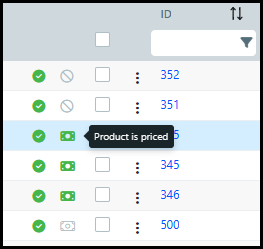
The products table now
shows only the columns you selected. Note that the Price column
is represented at the left side of the table with the green
dollar-bill icon. Hovering over the icon will display relevant
information.
3 Next, choose the filter settings you want to include in the view.
● Select a built-in or custom global filter if an existing filter suits this view.
For information on creating a custom global filter, see To create a custom global filter in this help topic
● Open the Choose Filter list and select the filter (either built-in or custom).
● If none of the existing filters suits this view, you can filter the data that you want included in the custom view by specifying the filter options in the data column header's text entry field or drop-down list.
● For instance, if you wanted the view to include only Non Printed Products and FF-Inventory type products, you would follow these steps:
● Click in the Type column drop-down list.
● From the list, select Non Printed Products and FF-Inventory.

The product table now
shows only Non Printed Products
and FF-Inventory products.

● Filter any additional columns as needed and set the sort order of any data columns.
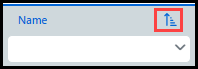
The search and sort options
will vary for the different data types, but the sort reverse
control will be in the top right-hand corner of the column
header.
For more information on searching and sorting data, see Search
and sort data below.
To remove a filter from a column, click
the x in the column header field.

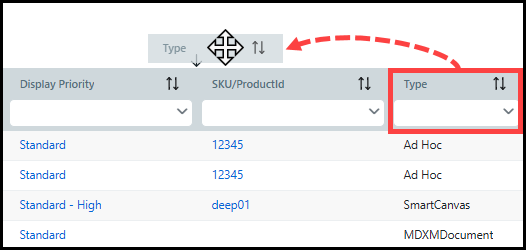
4 Rearrange the columns in the product table as needed.
● Simply drag a column and drop it in a new location.
5 Re-size the width of any columns as needed.
6 Save your view with a new name.
● Click
 and
select Save View As.
and
select Save View As.
● In the Name The View window View Name field, specify a descriptive name for the view (e.g., FG-Admin).
● Click Save.
Your new View is in the
list.
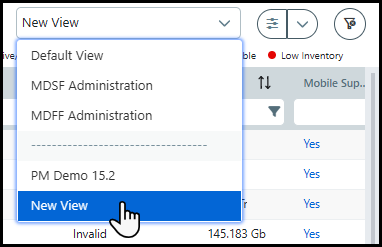
Note that the built-in system views are above the dashed line,
and your personalized views are listed below the dashed line.
7 From
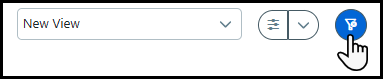
any view, you can click the un-filter icon to show all records and data columns in the table.
To make a view the default view
The default view you save will be applied automatically every time you log in (i.e., it is user-level).
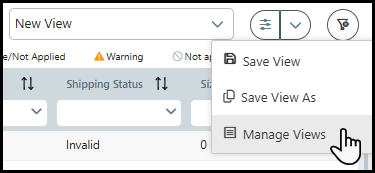
1 Open the Manage Views window.
2 On
the Manage Views window, click a view's white star to make it the default
view. The current default view is marked with a black star
to make it the default
view. The current default view is marked with a black star
 .
.
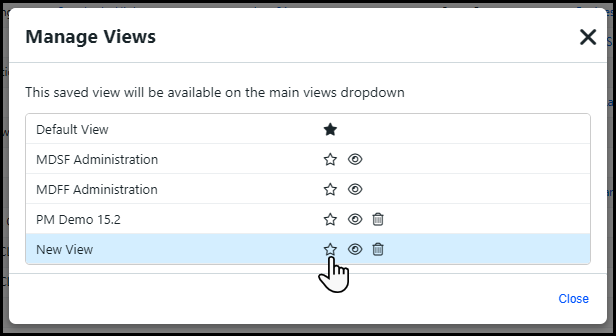
Use the eye icon
to show or hide any view in the View drop-down list. Use the
trash can icon  to delete any personalized
view you created. Note that you cannot delete the built-in
system views (the Default View, the MDSF
Administrator View, and the MDFF Administrator View if you
have licensed the Fulfillment module.
to delete any personalized
view you created. Note that you cannot delete the built-in
system views (the Default View, the MDSF
Administrator View, and the MDFF Administrator View if you
have licensed the Fulfillment module.
3 Click Close.
Edit
single products with quick access linksQuick Access Menu 
You can use the quick access menu to perform the tasks below on any product in the table.
● Modify Security
● Select Group
● Assign as Group Master
● Enable / Disable Design First
● Define Rules
● Enable / Disable Quick Order
● Copy
● Publish
● Related Products
● Delete Product
To open the quick access menu
1 Go to Administration > Products.
2 On the Manage Products page, locate the product you want to edit and hover on the quick access menu.
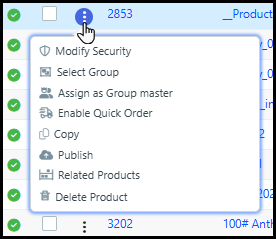
3 From the quick access menu, select the task you want to perform and refer to the corresponding section below.
Modify Security
You can set or change the security settings for the selected product.
1 Assign permissions to selected users, groups, companies, or departments to publish, manage, and purchase the product using the settings in the Change Product(s) Security window.
For more information on product security, see the help topic Security.
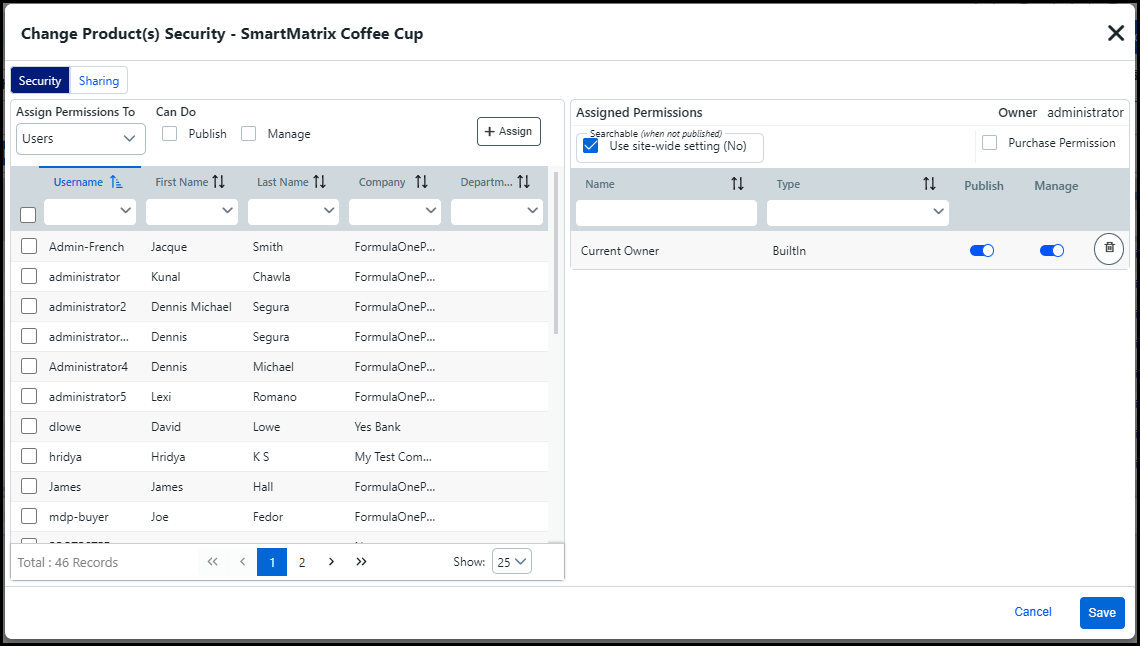
2 Click Save.
You can create a pricing group or assign a pricing group to a product. Pricing Groups allow you to provide volume pricing across multiple similar products. For example, a buyer adds 5 different business card products to their cart and MarketDirect StoreFront will aggregate quantities across all 5 products to derive the volume price.
Each pricing group contains a single master product that dictates the pricing, and quantity discounts, of the other products in the group.
1 To create a pricing group:
● Choose Select Group from the quick access menu to open the Select Group window.
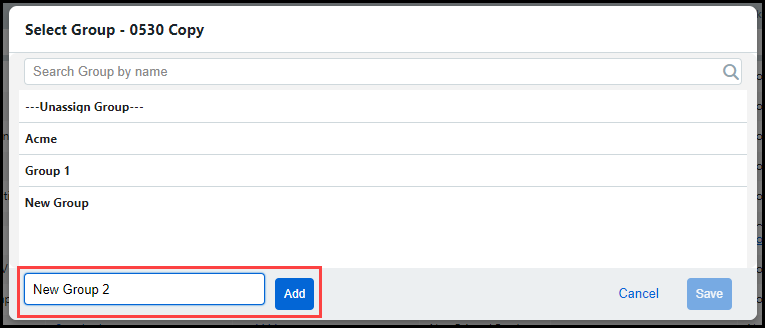
● Enter a name for the pricing group into the Add Group field.
● Click Add.
To delete a pricing group, unassign all products from the group.
2 To assign a product to a pricing group:
● Choose Select Group from the quick access menu for the appropriate product.
● Click the desired pricing group in the Select Group window to assign the product to that pricing group.
● Click Save.
If you assign a product to a new pricing group, it will overwrite the previous pricing group.
3 To unassign a product from a pricing group:
● Choose Select Group from the quick access menu for the appropriate product.
● Click ---Unassign Group--- in the Select Group window to unassign the product from that pricing group.
● Click Save.
You can assign a master product to a Pricing Group. Each Pricing Group contains a single master product that dictates the pricing, and quantity discounts, of the other products in the group. If there is no price assigned to the master product, then the administrator will need to provide a quote to the buyer.
1 Choose Assign as Group Master from the quick access menu for the appropriate product.
● The
master product will designated with the master icon ( )
in the Pricing Group column.
)
in the Pricing Group column.
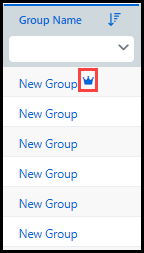
If you delete the master product you must assign a new master product, or the other products in the pricing group will revert to their individual pricing.
Enable / Disable Design First
You can enable or disable SmartCanvas products to automatically launch the SmartCanvas designer after a buyer clicks the Buy Now button for the product. When Design First is disabled, SmartCanvas products will automatically open to the Quick Order Workflow.
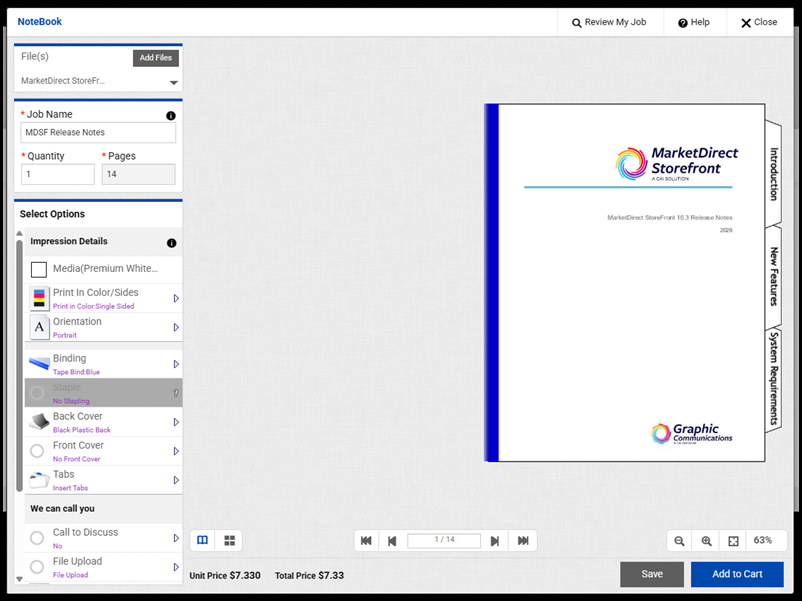
1 Choose Enable or Disable Design First from the quick access menu for the appropriate SmartCanvas product.
Define Rules
You can quickly access the Manage Dynamic Web Forms Rules page for VDP and SmartCanvas products, where you can build "smart" web forms that change based on buyer input.
1 Choose Define Rules to open the Manage Dynamic Web Forms Rules page.
For more information on dynamic web forms, see Dynamic Web Forms for Variable Data Products - VDP.
Enable / Disable Quick Order
You can enable or disable ad-hoc or static products for quick order. When a product is enabled for quick order, the Customize button becomes a Buy Now button. Buyers can still fully customize the product by clicking the More Options button on the Product page.

1 Choose Enable or Disable Quick Order from the quick access menu for the appropriate product.
Copy
If you want to create a new product that is similar to an existing product, using this Copy feature can save time (versus creating the new product from scratch). You will simply copy the product, save it with a new name and / or display as name, and then edit the product's properties in the product builder (either now or later).
1 In the Copy Product window, specify a Name and Display As name for the product.
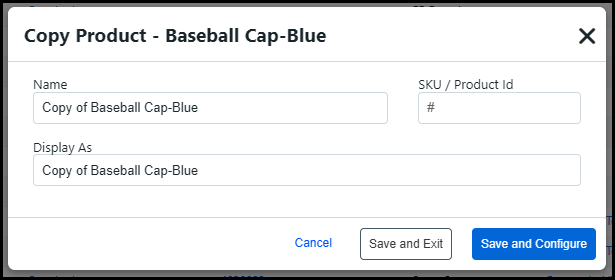
2 Specify a SKU/Product ID for the product.
If you copy a SmartMatrix
product, then the
Copy product window will include Template
Name and Description fields
for the SmartCanvas
template associated
to the product.

3 Click Save and Configure if you want to configure the product using the settings in product builder now.
4 Click Save and Leave if you want to close the Copy Product window and configure the new product using the settings in the product builder later.
Publish
You can publish or unpublish the selected product to or from a specified category(ies).
1 In the Publish / Un-Publish window, select the category or categories to or from which you want to publish or unpublish the selected products.
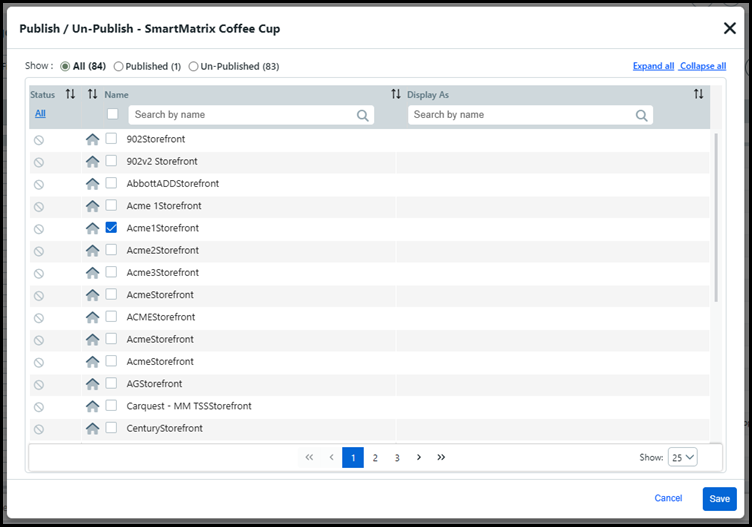
● In the Show field, select the categories to show in the Publish / Un-Publish window:
● All
● Selected
● Un-Selected
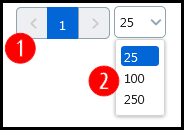
Note:
Use the page selector 1 to
move between pages and the record selector 2
to choose how many categories to show per page
(25, 100, 250).
2 Click Save.
Related Products
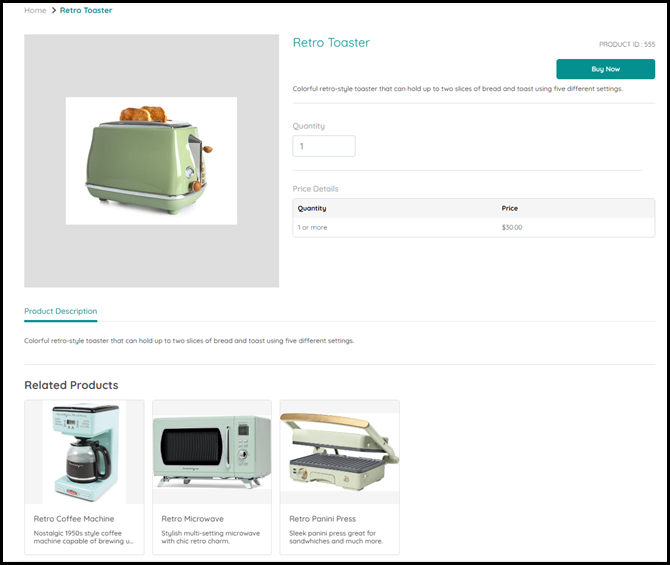
You can assign related products to appear on the buyer-side Product Information page of the selected product.
1 Locate the product(s) to assign from the Add / Remove Products window by using the search, sort, and filter options available for each column in the table.
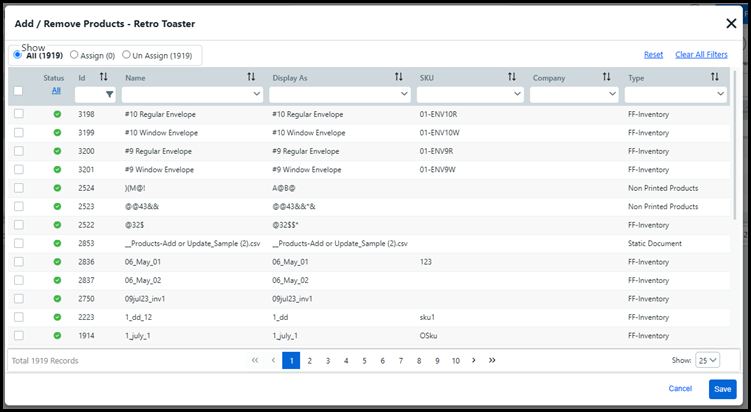
You can filter the products available
in the table by selecting one of the following radio buttons:
-All shows
all the products in the system.
-Assign shows
the products already assigned as a related product.
-Un Assign shows
the products not assigned as a related product.
2 Select the check-box next to the products you want to assign as related product(s).
Related Products can be a recommendation of similar products, or products often bought together.
3 Click Save.
Delete Product
You can delete the selected product.
1 Click OK.
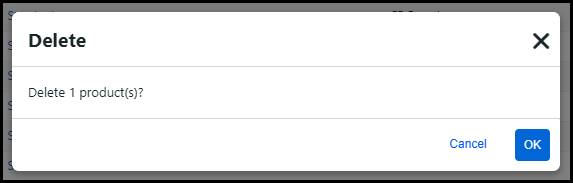
You cannot restore deleted products.
2 In the Delete window, click OK.
Perform
bulk processing operations on selected productsThe bulk processing feature lets you manage large product data sets efficiently by executing various operations on all selected products in one pass. The bulk operations include:
● Select Company
● Delete Product(s)
● Modify Security
● Publish / Un-Publish
● Related Products
● Select Group
● Convert Npp to Rental
● Enable / Disable Quick Order
1 Apply all filters on the data to isolate the subset of products for bulk processing.
2 Click the Select all filtered records option.

You can also apply bulk operations to
a single record by clicking the check-box for the appropriate
record in the table.
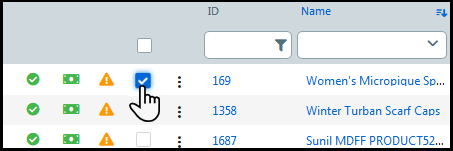
3 From the bulk operation panel, select the bulk operation you want to perform on the selected product(s).

● Select Company: This operation lets you either associate all selected products with a specified company or remove the company association for all selected companies.
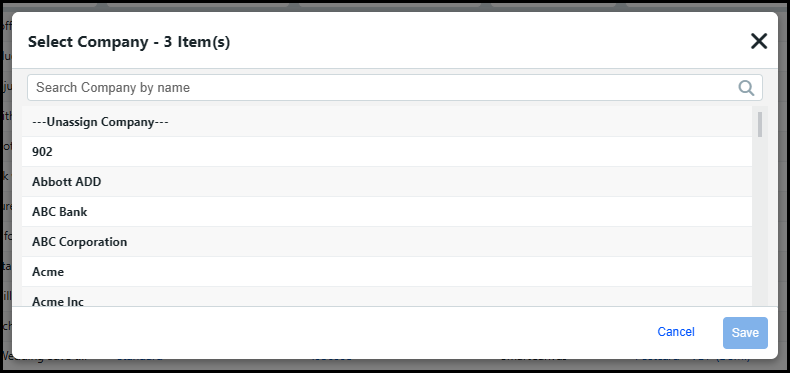
● To associate all selected products with a company:
● Select the company with which to associate the products.
Use the search field as needed for long company lists.
● To remove the company association from all selected products:
● Click ---Unassign Company---.
● Click Save to execute the operation on all selected product records.
● Delete Product(s): This operation lets you delete all selected products.
WARNING: Exercise caution!
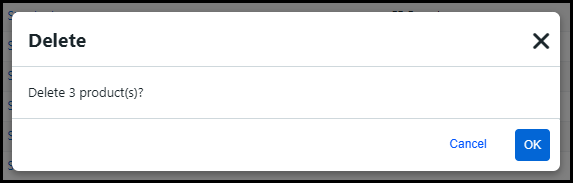
● Click OK.
● Click Yes to confirm the deletion.
● Modify Security: This operation lets you change the security settings for all selected products.
● You can assign permissions for all selected products using the tools in the Change Product(s) Security window.
For more information on product security, see the help topic Security.

● Click Update Security.
● Click Close.
● Publish / Un-Publish: This operation lets you publish or un-publish all selected products to or from a specified category(ies).

● In the Show field, select the categories to show in the Publish / Un-Publish window:
● All
● Selected
● Un-Selected
Use the page selector
(1) to
move between pages and the record selector (2)
to choose how many categories to show per page
(25, 100, 250).

● Select the category or categories to or from which you want to publish or un-publish the selected products.
● Click Publish or Un-Publish.
● Click Close.
● Related Products: This operation lets you assign related products to appear on the buyer-side Product Information page of the selected products.
● To assign related products to all selected products:
● Locate the product(s) to assign from the Add / Remove Products window by using the search, sort, and filter options available for each column in the table.
You
can filter the products available in the table by selecting
on of the following radio buttons:
-All shows all the
products in the system.
-Assign shows the products
already assigned as a related product.
-Un Assign shows the
products not assigned as a related product.
The products selected for the bulk assignment of related products will not appear in the Add / Remove Products window. For example, if you select Business Cards A and Business Cards B, then neither of these products will be available in the window.
● Select the check-box next to the products you want to assign as related product(s).
Related Products can be a recommendation of similar products, or products often bought together.
● Click Save.
● Select Group: This operation lets you either associate all selected products with a specified pricing group or remove the pricing group association for all selected companies.
● To associate all selected products with a pricing group:
● Select the pricing group with which to associate the products.
Use the search field as needed for long pricing group lists.
● To remove the company association from all selected pricing groups:
● Click ---Unassign Group---.
● Click Save to execute the operation on all selected product records.
● Convert Npp to Rental: This operation lets you convert non-printed products to rental products.
● To convert all selected non-printed products to rental products:
● Click Convert Npp to Rental in the bulk operations panel.
● Click Yes in the Confirm Changes window.
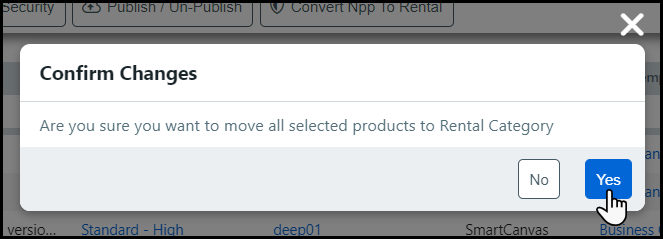
A non-printed product converted to a rental product, CANNOT be converted back to a non-printed product.
For more information on rental products, see the Fulfillment help topic.
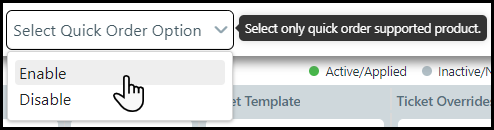
● Enable / Diable Quick Order: This operation allows you to enable or disable multiple ad-hoc or static products for quick order.
If you select a mix of products that are enabled and disabled for quick order, then the bulk operation will default to Enable Quick Order. If all the products selected are enabled for quick order, then the bulk operation will be Disable Quick Order.
Selected products that are not ad-hoc or static will be ignored by the bulk operation.
● To enable or disable selected products for quick order:
● Click Select Quick Order Option in the bulk operations panel.
● Select Enable / Disable from the drop-down list.
4 Click the clear icon to close the bulk operation panel.

Import
and export products from the Manage Products tableThe easy import and export buttons on the Product Management page allow administrators to quickly export product information into a CSV file, or import product edits into MarketDirect StoreFront using a CSV or ZIP file.

1 Select the products to export from the Product Management table:
Filter the Product Management table using the search, sort, and filter options available for each column.
You
can also use the Global
Search or AI search
on the Product Management page.
Click the product check-box in the table.

2 Click the Export as CSV button.

If no specific products are selected, then Export as CSV will export all products available in the table.
1 Edit the Products template CSV:
The required fields for all product
types are Name, Display Name,
and Type. The
data you enter must match the data for these fields in the
system.
The following is a list of required fields for specific product
types:
-Ad Hoc—Ticket Template
-Static Document—Ticket
Template and Content File
-Digital Download—Content File
-SmartCanvas—Ticket
Template and SmartCanvas Template Name
MarketDirect StoreFront
recommends administrators complete as many fields as possible.
The first row of the table is reserved
for column headings, so begin your data on row two of the
table.
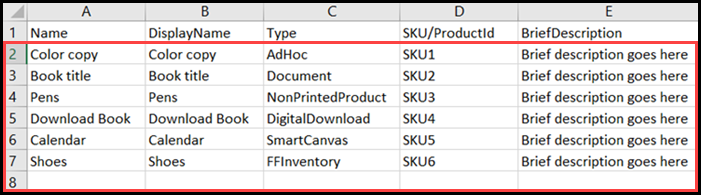
Name: Enter any name for the product. (Limit: 50 characters)
DisplayName: Enter any display name for the product. (Limit: 2,000 characters)
Type: Enter one of the six supported import product types: AdHoc, Document, NonPrintedProduct, DigitalDownload, SmartCanvas, and FFInventory
Use "Document" for Static Document products.
SKU/ProductId: Enter any ID for the product. (Limit: 50 characters)
BriefDescription: Enter any brief description for the product. (Limit: 2,000 characters)
You can format the text here using standard HTML format tags (e.g., <B> ... </B> or <U> ... </U> ).
Icon: Enter the name of the image file(s) to use for the product icon.
Supported image file types: bmp,
gif, jpeg, jpg, pjpeg, png.
Multiple Icon file names must be separated
by a comma.
To have MarketDirect StoreFront create an automatic thumbnail image for the product icon, enter AutoThumbnail in the Icon column. The auto-thumbnail option is only available for the Static Document product type.
LongDescription: Enter any long description for the product. (Limit: 4,000 characters)
You can format the text here using standard HTML format tags (e.g., <B> ... </B> or <U> ... </U> ).
DetailImage: Enter the name of the image file(s) to use for the detailed image of the product.
Supported image file types: bmp,
gif, jpeg, jpg, pjpeg, png.
Multiple Detail Image file names must be separated
by a comma.
To have MarketDirect StoreFront create an automatic thumbnail image for the product icon, enter AutoThumbnail in the DetailImage column. The auto-thumbnail option is only available for static products, which is the Document product type.
Active: Enter TRUE or FALSE to indicate whether or not the product will be active or inactive.
TurnAroundTime: Enter a turnaround time for the product using any numeric value between 0 and 9999.
TurnAroundTimeUnit: Enter one of the four supported turnaround time units: Hour, Day, Week, Month
QuantityType: Enter one of the four supported quantity types: Any, Multiple, Fixed, NA
MaxOrderQuantityPermitted: Enter a maximum order quantity using any numeric value between 0 and 100000.
Quantities: Enter any quantity/quantities for the product separated by a hyphen.
For example, if you want to allow buyers to order quantities of 10, 20, or 50, type 10-20-50 in the Quantities column. Leave the field blank if you want to allow buyers to order any quantity.
AllowBuyerToEditMultipleQuantity: Enter TRUE or FALSE to indicate whether or not buyers will be able to edit multiple quantity values for the product.
EnforceMaxQuantityPermittedInCart: Enter TRUE or FALSE to indicate whether or not you want the shopping cart to enforce the maximum quantity (i.e., permit passing orders with quantities that exceed the specified maximum).
OrderQuantitiesAllowSplitAcrossMultipleRecipients: Enter TRUE or FALSE to indicate whether or not you allow order quantities to be split across multiple recipients.
DescriptionFooter: Enter any additional information about the product. The footer will be shown on the storefront and in the product details.
ProductNotes: Enter any notes for the product. (Limit: 4,000 characters)
KeyWords: Enter any descriptive keywords that will help buyers searching for the product.
Separate keywords with a comma ( , ), spaces are not necessary, and note that you total character count for keywords cannot exceed 500.
SEOTitle: Enter the product page title.
UrlSlug: Enter the part of the URL that describes the web page's content.
MetaDescription: Enter a short description of the product.
MarketDirect StoreFront recommends you update this field in order to maximize the SEO for the product page. It is a best practice to keep the Meta Description to 50 words or less.
MobileSupported: Enter TRUE or FALSE to indicate whether or not you want the product to be shown / available to buyers accessing the storefront on a mobile device.
BuyerDeliverableType: Enter one of the 3 supported deliverable types: Print, PrintAndDownload, Download
WeightValue: Enter the product's weight using any numeric value.
WeightUnit: Enter one of the four supported weight units: oz, lb, g, kg
WidthValue: Enter the product's width using any numeric value.
LengthValue: Enter the product's length using any numeric value.
HeightValue: Enter the product's height using any numeric value.
Dimension: Enter one of the four supported dimension units: Inches, Feet, Centimeters, Meters, mm (Millimeters), Yard
MaxQuantityPerSubcontainer: Enter the maximum quantity per subcontainer.
ShipItemSeparately: Enter TRUE or FALSE to indicate whether or not you want to ship the products separately from other products.
ContentFile: Enter the name of the content file(s) for the product (e.g., for digital download and static, or "Document," product types).
Leave this column empty for products
with no content file.
Multiple Content File names must be separated by a
comma.
TicketTemplate: Enter the ticket template associated with the product.
The ticket template name must match an existing ticket template in MarketDirect StoreFront.
ProductNameToCopySecuritySettings: If you want to apply an existing product's security settings to the imported product, Enter the name of the existing product (must match the Name not the Display Name).
This will cause MarketDirect StoreFront to apply the security settings (purchase, manage permissions) for an existing product to the product you are importing.
MISItemTemplate: Enter the MIS SKU for the product.
SmartCanvasTemplateName: Enter the SmartCanvas template name.
DynamicPreview: Enter TRUE or FALSE to indicate whether or not you want to enable dynamic preview of the product.
AllowBuyerConfiguration: Enter TRUE or FALSE to indicate whether or not you want to allow buyer configuration for the product.
StartDate: Enter the start date for the product to be active on the storefront.
If you do not specify a Start Date, then the product will be active on the storefront by default.
EndDate: Enter the end date for the product to be active on the storefront.
If you do not specify a End Date, then the product will stay active on the storefront.
StoreFront/Categories: Enter the storefront(s) and categories to which the product is assigned.
You can assign the product to multiple storefronts and/or categories.
Multiple storefronts or categories must be separated by a comma. The order of the storefronts or categories does not matter.
BuyNowButtonDescription: Enter the button text for the Buy Now button on the storefront.
UseNewSmartCanvas: Enter TRUE or FALSE to indicate whether or not to enable SmartCanvas Beta for the SmartCanvas template.
Commodity Code: Enter the tax code to specify the type of item for more accurate tax calculations.
You can obtain tax codes from the official site of your external tax service provider.
ExemptShipping: Enter TRUE or FALSE to indicate whether or not you want to exempt shipping charges for the product.
ExemptTax: Enter TRUE or FALSE to indicate whether or not you want to exempt taxes on the product.
PDFPreview: Enter TRUE or FALSE to indicate whether or not you want to enable the Preview PDF setting:
TRUE enables a preview link on the Product Details page and allows buyers to click a thumbnail image on the storefront to show a watermarked preview of the Static Document product.
FALSE disables the preview of the product on the storefront.
The following fields are only applicable to Fulfillment (FFInventory) products:
PickLocation: Enter the pick location of the product.
WareHouseName: Enter the name of the warehouse where the product is stored.
Warehouse Name is only necessary if you have the same pick location in multiple warehouses.
IsHighValueProduct: Enter TRUE or FALSE to indicate whether or not the product has a high value.
HasUniqueSkid: Enter TRUE or FALSE to indicate whether or not the product has a unique skid.
PickStrategy: Enter how the product is to be picked after it is ordered. There are three supported pick strategies:
FIFO Skid Id
LIFO Skid Id
Default Location, FIFO Skid Id
NotifyOnInventoryReceive: Enter TRUE or FALSE to indicate whether or not you want to send an email notification to specified recipients when you receive inventory for the product.
CustomerRep: Enter the customer representative at the company who is supplying the product.
SalesRep: Enter the sales representative at your company who is responsible for servicing the customer who is supplying this product.
PhysicalCountInterval: Enter one of the five supported physical count intervals: None, Weekly, Monthly, Quarterly, Yearly
StorageType: Enter the special storage needs for the product.
AllowBackOrder: Enter TRUE or FALSE to indicate whether or not you want to allow back orders.
BackOrderRule: Enter what happens when a buyer's order quantity for a particular product exceeds the available stock on hand. There are five back order rules: None, Cancel entire order, Cancel back order - ship partial, Back order - ship partial, Backorder Entire Order
BackOrderMaxQty: Enter the maximum quantity of the product allowed for back order.
ShowInventoryWhenBackOrderAllowed: Enter TRUE or FALSE to indicate whether or not you want buyers to see inventory levels if you allow back orders.
Threshold: Enter the quantity threshold that will trigger the system to send an email notification that inventory for the product is getting low.
If you set the threshold to 100, when the Stock on Hand drops to 100, the system will send email notifications to specified recipients.
Emails: Enter the emails that will receive a notification when the product's inventory reaches the Threshold or a quantity of the product is received.
Barcode: Enter the alpha-numeric value of the product's barcode.
EnableProductReturn: Enter TRUE or FALSE to indicate whether or not you want to enable returns for the product.
AutoReplenishmentToDefaultLocation: Enter TRUE or FALSE to indicate whether or not to enable auto-replenish of inventory to the Default Pick Location.
AutoReplenishmentToDefaultLocationMinQty: Enter the minimum quantity of inventory allowed in the Default Pick Location before an inventory transfer request is triggered.
AutoReplenishmentToDefaultLocationMaxQty: Enter the maximum quantity of inventory allowed to be replenished automatically. Inventory will be moved from other locations to the Default Pick Location based on the Inventory Pick Strategy.
For more information on Auto Replenishment to Default Location, see Inventory Transactions.
Enable Substitution: Enter TRUE or FALSE to enable substitute products for the product.
For more information on substitute products, see Inventory Substitution.
2 Click Import CSV or ZIP file.

3 Select the appropriate file from you computer and click Open.
A ZIP file is only necessary if you are updating product icons, detail images, and/or content files. The new image and/or content files must be included with the Products spreadsheet in the imported ZIP file.
4 The Import Information window will open providing details about the import.
1 Click Show Import History to open the Import History window.
2 The Import History window includes details about previous imports.

ID: The import ID number.
Creation Date: Date and time the file was imported into MarketDirect StoreFront.
File Name: Name of the imported file.
Click the File Name to download a copy of the file.
Total Records: Total number of products in the imported CSV file.
Updated Records: Number of imported products successfully updated.
Failed Records: Number of imported products that failed to update.
If
the CSV file contains an error, you can click the link in
the Failed Records
column to open a
copy of the CSV that includes the error reason. You
can make necessary changes to the error file then re-import
it. You do not have to delete the ]]]]]]]]]]ERROR for the
record.

Status: The status of the import.
Username: The user that initiated the import.
● To create an ad hoc, non-printed, kit, static, or Picsart product
● To create kit products using the modern product builder
● To create a variable data product (VDP, FusionPro)
● To create a SmartCanvas product
● To create a product matrix product
● To create a digital download product
● To create a SmartMatrix product


 in
the table will provide you with information on the
alert.
in
the table will provide you with information on the
alert.  Indicates
inventory for the product is below the minimum threshold
set for the product.
Indicates
inventory for the product is below the minimum threshold
set for the product. /
/
 The status of the product (inactive/active=unavailable/available
for buyers to order on storefront given all other
access is permitted).
The status of the product (inactive/active=unavailable/available
for buyers to order on storefront given all other
access is permitted).

 for a list of search operators you can
use.
for a list of search operators you can
use. 
 The
The instead of a column. For
more information on personalized views, see
instead of a column. For
more information on personalized views, see  indicates that
the product is configured for shipping with ExpressRater.
indicates that
the product is configured for shipping with ExpressRater.